Project Management & Calendar

Enterprise Implementation and Sales Project Delivery

Plan projects, structure phases and WBS tasks, manage dependencies on an interactive Gantt, reuse delivery templates, and keep execution visible across the portfolio.

IxpertOnCloud connects project work with an operational calendar—so activities, meetings and follow-ups stay linked to projects, phases and WBS tasks, with notifications and review workflows for the team.

Project register Phases & WBS Gantt & critical path Templates Calendar linked
01

Define the project

Create from a template or new header—customer, owner, type, dates and description.

02

Plan phases & tasks

Build WBS phases, durations, dependencies and working-calendar schedules.

03

Schedule on Gantt

Track critical path, baseline variance, milestones and cascade changes.

04

Execute with Calendar

Push WBS work to Calendar; manage activities, meetings and reviews.

Project delivery

One Portfolio for Implementation, Sales, Internal and Hypercare Work

IxpertOnCloud Project Management is built for enterprise implementation and sales project delivery. Teams manage the full lifecycle from Planning through Active, On Hold, Completed or Cancelled—with clear ownership, progress and planned end dates.

Project types supported in the application include Implementation, Sales, Internal and Hypercare. Customer records link from ERP; sales leads can be linked from CRM on the project header.

Core project capabilities

Register, Plan, Assign and Track Delivery

Project Dashboard

See portfolio health at a glance and jump into delivery workspaces.

  • KPI counts for Total, Active, Planning, On Hold, Completed, Implementation and Sales projects
  • Recent projects with code, name, type, customer, status, % complete and end date
  • Quick navigation to Projects, Gantt, Tasks, Templates and Create from Template
  • Open each project’s plan directly from the grid

Project Register

Maintain a searchable register of every project in the portfolio.

  • Search by code, name or customer
  • Filter by status and project type
  • Grid columns for code, name, type, customer, status, % complete, end date and owner
  • Create new projects or create from a template
  • Edit, open Plan, open Gantt, or soft-delete a project

Project Plan — Phases, Tasks & Dependencies

Manage the work breakdown with working days versus calendar days and rescheduling controls.

  • Phases / WBS: sequence, code, phase, depends-on, days, start/end, status, % complete; save, end-from-duration and reschedule successors
  • Tasks: code (with milestone marker), title, days, dates, status and % complete
  • Dependencies: predecessor and successor phases with dependency type
  • Working Calendar: optional skip of off-days and holidays; configure Mon–Sun work days; add or delete holidays
  • Task statuses: Backlog, Todo, In Progress, Review, Done
  • Header shows project code, status, % complete, planned end, working days and calendar days

Project Tasks Workspace

WBS tasks stay in sync with Calendar tasks and notifications.

  • Filter by project across the portfolio
  • WBS Tasks tab: project, phase, task, assignee, due date, status, calendar link indicator
  • To Calendar action to push a WBS task into the Calendar module
  • Calendar Linked tab: subject, project, phase, PM task, start/end, status and creator
  • Create a calendar task with project, phase, optional PM task link, subject, description and datetimes
  • Open the full Calendar module from the workspace

Interactive scheduling

Gantt Chart with Critical Path, Baseline and Cascade

Dependencies, critical path, baseline variance, drag scheduling and cascade updates—built for delivery control.
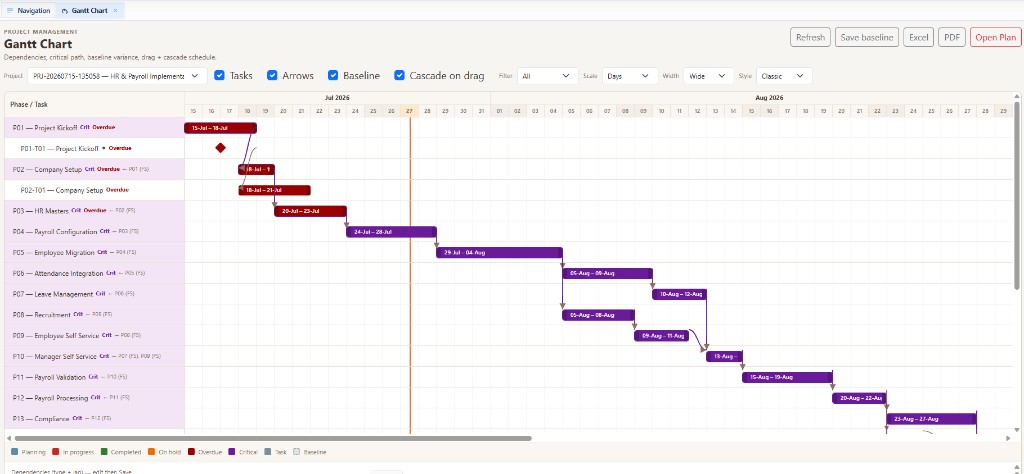
Timeline & Controls

  • Select a project; toggle Tasks, Arrows, Baseline and Cascade on drag
  • Filter All, Critical, Overdue or Milestone items
  • Scale by Days, Weeks or Months; width Narrow to Widest; Classic, Compact or Contrast styles
  • Today line, weekends, phase and task bars, progress fill and milestone markers
  • Labels for Crit, Overdue and Float; dependency arrows between bars
  • Drag to move, resize start or resize end; optional cascade to successors

Dependencies, Baseline & Export

  • Dependency types: FS, SS, FF and SF with lag days
  • Inline dependency editor: from, to, type, lag and save
  • Save baseline with baseline name and capture time
  • Export to Excel and PDF; open the Project Plan from Gantt
  • Legend for Planning, In Progress, Completed, On Hold, Overdue, Critical, Task and Baseline
IxpertOnCloud Gantt chart with phases, dependencies and critical path
Gantt Chart — tasks, dependency arrows, baseline, cascade schedule, Excel & PDF export

Repeatable delivery

Project Templates and Create from Template

Template Library

  • List templates by code, name, type and phase count
  • View, edit or use a template to start a project
  • Author templates with code, name, category, type, active flag and description
  • Define phases with sequence, code, name, days and description
  • Saving a template rebuilds tasks and sequential FS dependencies
  • Inline create: project code, name, customer, start and calculated end

Create from Template Wizard

  • Choose template; set code, name, customer, owner, type, project start and description
  • Review and adjust the phase grid (include, days, dates, depends-on)
  • Recalculate dates before create
  • Opens the Project Plan after the project is created
  • Dashboard empty-state guidance: clone the HR template to start

Operational calendar

Activities, Tasks, Events and Meetings—Linked to Projects

The Calendar module plans day-to-day work with sub-tasks, progress roll-up, assignees and notifications—and optionally binds items to Project, Phase and PM Task.
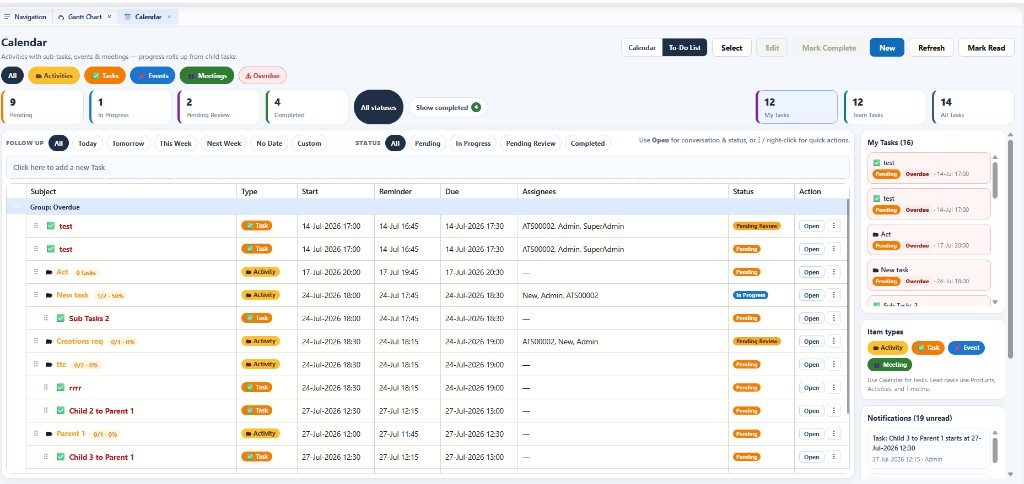
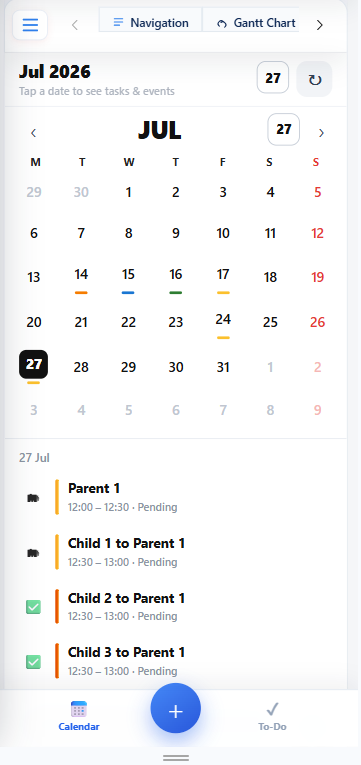
Calendar Views & Item Types

  • Views: Calendar and To-Do List (with mobile-friendly month agenda)
  • Scheduler: Day, Work Week, Week, Month and Timeline (7-day)
  • Item types: Activity, Task, Event and Meeting
  • Filters by type, overdue, status counts; My / Team / All Tasks (permission-gated)
  • Follow-up presets: Today, Tomorrow, This Week, Next Week, No Date or custom
  • Show or hide completed items

Execution, Review & Collaboration

  • To-Do grid with subject tree, drag onto parent, reminder, due date, assignees and status
  • Multi-select edit and mark complete; quick task-update panel with conversation thread
  • Full form: all-day, start, deadline, label, parent, availability (Free / Tentative / Busy / Out of Office)
  • Notify minutes before; recurrence (Daily, Weekly, Monthly); location and description
  • Assignee roles: Assignee, Participant, Observer—with per-person task status
  • Task statuses: Pending, In Progress, Pending Review, Completed; Assigner Accept & Close / Reopen
  • Unread notifications with mark-read; resources link/unlink
  • Optional Project, Phase and PM Task fields on calendar items

How Project Management and Calendar Connect

  • WBS tasks sync with Calendar tasks and notifications
  • Push a WBS task to Calendar from the Project Tasks workspace
  • Create calendar tasks already linked to project, phase and PM task
  • Activity progress can roll up from child sub-tasks
  • Project Plan “Working Calendar” (work days / holidays) is separate from the appointments Calendar module
IxpertOnCloud Calendar To-Do list with status cards and task grid
Calendar — To-Do List with status counts, My / Team / All Tasks, follow-ups and notifications
IxpertOnCloud Calendar mobile month agenda
Mobile calendar — month view with day agenda and parent/child tasks

Portfolio visibility

PM Reports

Portfolio Summary

  • Code, name, type, customer, status, % complete, planned end and owner
  • Refresh the portfolio view from the reports workspace

Differentiators

Why Teams Use Ixpert Project Management

01

Delivery-Ready Templates

Standardize implementation and sales phases, then create projects with schedule overrides.

02

Real Scheduling Control

Gantt with critical path, float, baseline, drag/cascade and FS/SS/FF/SF dependencies.

03

Working-Day Awareness

Optional working calendar, week pattern and holidays so plans reflect real capacity.

04

ERP & CRM Context

Link customers from ERP and sales leads from CRM on the project header.

05

Calendar Execution

Keep WBS work and day-to-day activities, meetings and reviews in one connected loop.

06

Portfolio Clarity

Dashboard KPIs and portfolio summary keep status, progress and owners visible.

Deliver Projects with Clear Plans and Connected Follow-Through

See how IxpertOnCloud Project Management and Calendar support implementation and sales delivery from template to Gantt to daily execution.